
Path through this phrasebook: Home / Screens
Phrase chapters, one for each Pandagoo screen
202 phrase cards in nine chapters, filed by the screen where each line appeared and ordered the way an order moves through the site.
How a phrase card is laid out
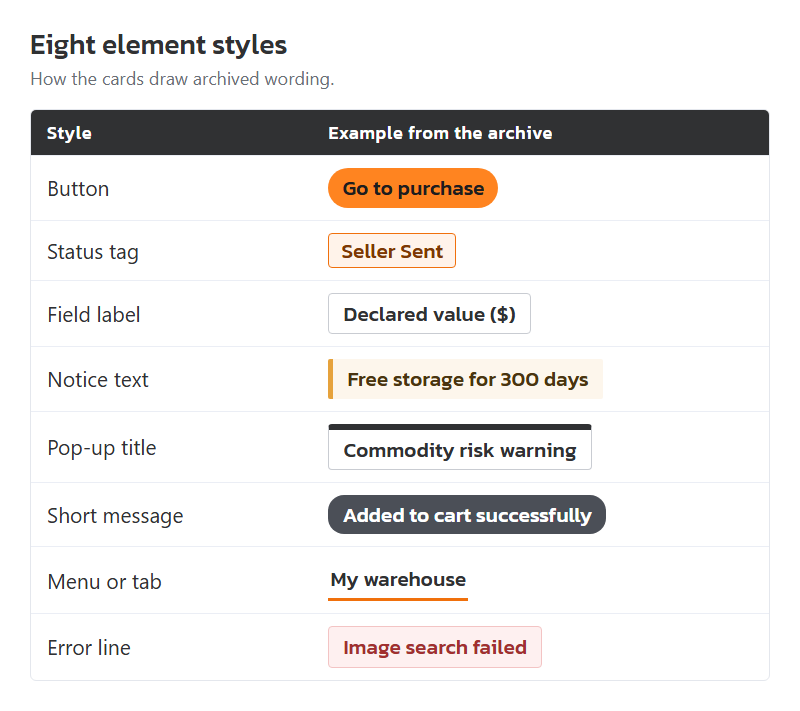
Each card starts with the archived wording, drawn in the style of the interface element it belonged to, so a button looks like a button and a status looks like a tag. Under it come three lines: where the wording was seen, what it meant, and your move. Long notices are shortened to their opening words followed by an ellipsis and explained in full in our own words.
- Clickable buttonsomething you press
- Status taga tag showing where an order, parcel or request stands
- Field labela label or hint beside a box you fill in
- Notice texta reminder or rule printed on the page
- Pop-up titlethe title of a window that opens over the page
- Short messagea short message that appears and fades
- Menu or taba menu entry or tab name
- Error linea message saying something went wrong
The nine chapters
Sign-up and sign-in
What each archived Pandagoo account phrase meant: email codes, the slider puzzle, Google and Discord log-in, password rules and the email check pop-up.
25 cards
Search and product page
Archived Pandagoo search and product-page wording, decoded: the info panel, minimum quantity, option errors, the product risk prompt and the price-change box.
34 cards
Cart and checkout
Archived Pandagoo cart and payment wording decoded: seller-to-warehouse fee, the six-step progress bar, the handling-fee formula, payment delays and balance top-ups.
23 cards
Order list
Archived Pandagoo order list wording explained: purchase statuses from payment to warehouse, balance-due lines, bulk upload messages and the numbers worth keeping.
20 cards
Warehouse and QC photos
Archived Pandagoo warehouse wording decoded: My warehouse tags, quality inspection and defect photos, the 300-day storage line, forwarding orders and abnormal parcels.
20 cards
Parcels and freight
Archived Pandagoo parcel wording decoded: Generate package, declared value 1-120, system and manual quotes, rehearsal packages, freight estimator labels and goods types.
25 cards
After-sales and claims
Archived Pandagoo after-sales wording decoded: return and exchange statuses, seller response windows, the 12-day refund line, parcel insurance labels and customs notices.
19 cards
Wallet, coupons and referrals
Archived Pandagoo wallet wording decoded: top-up limits, withdrawals, international bank transfers and the HKD 65 fee, coupon tabs and the Bronze and Silver referral rates.
18 cards
Template leftovers and errors
Which archived Pandagoo lines are white-label template text rather than facts about the agent: "platform", the Yisheng company sentence, haijun@platform, unfilled {amount} values and admin errors.
18 cards
Why sorted by screen and not from A to Z
A message on screen is easier to understand next to its neighbours than next to whatever word happens to share its first letter. "Pending to pay difference" makes sense beside "Product balance due" and "Pay Difference", which appear on the same order. Filed by screen, a chapter also reads as a description of that screen, which helps when you have no screenshot to go on.
For the times you do not know the screen, the phrase finder searches every chapter at once.
Limits of an archive with no screenshots
The stored copy of the site kept text, not pictures. Where a card says a line appeared next to a box or under a button, that placement is our reading of how the text was grouped in the code, checked against how the same template normally lays out forms. The mock-ups at the top of each chapter are drawings, not captures.
Numbers that the server filled in when a page loaded, such as fees, route prices and some limits, are missing. Cards show them as the archive does, in curly brackets, and say plainly when a value is unknown.