Path through this phrasebook: Home / Screens / Parcels and freight
Parcel screens: building a package, quotes and the freight estimation page
Turning stored items into one international parcel took three screens: pick items, give an address and a declared value, then choose a route and a quote method. The freight estimator used the same labels. Cards for each, then how the weight is worked out.
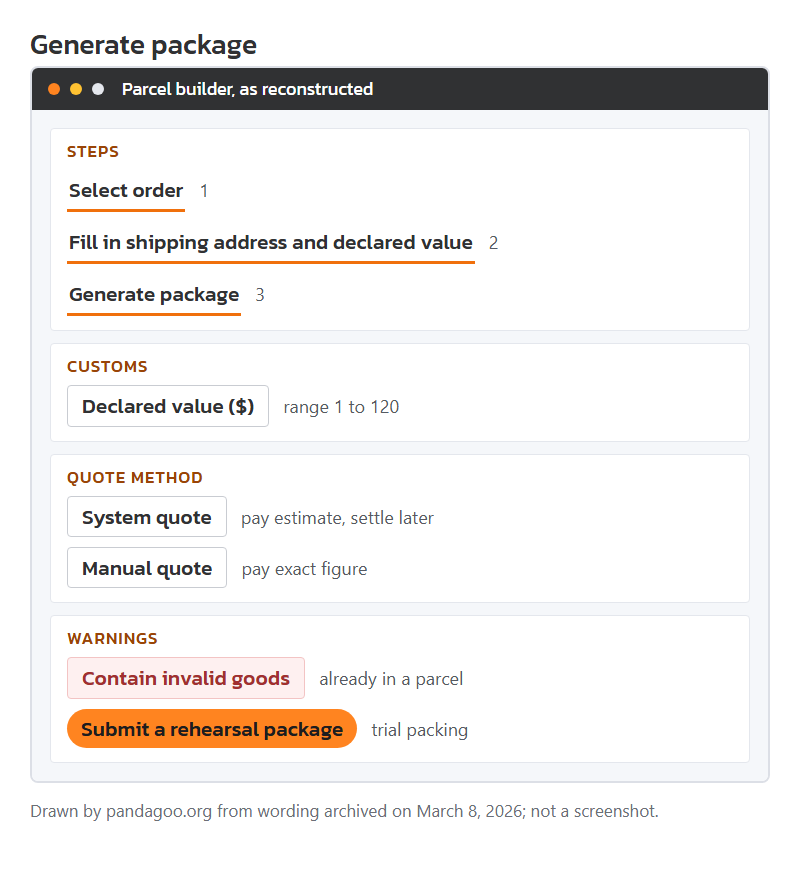
Mock-up of the archived Generate package flow, drawn by this site: three steps, declared value box and the two quote methods.
Generate package, step by step
The parcel form had three numbered steps. Its lines in order:
Clickable button
Generate package
Seen on
Warehouse action, and the name of the last step of the parcel form.
Means
Starts building an international parcel from items you tick.
Your move
Tick everything you want in one box; adding items later means a new parcel.
Field label
Select order
Seen on
Step one.
Means
Choose which stored items go in.
Your move
Items already in another parcel show as invalid, see below.
Field label
Declared value ($)
Seen on
Box in step two, with the hint "range: 1-120".
Means
The customs value of the parcel, in US dollars. Only figures from 1 to 120 were allowed.
Your move
Customs rules in your country decide what is correct. The form limits are not advice on what to enter.
Field label
Estimated weight by the system
Seen on
Shown in the parcel information block.
Means
A guess from the item weights on file, before anything is packed.
Your move
Expect the packed weight to be higher; boxes and fill add grams.
Field label
Select logistics
Seen on
Route picker.
Means
The carrier line for this parcel. Route names and prices were served live and were not archived.
Your move
Check each route's goods types and weight limits before choosing.
Error line
Contain invalid goods
Seen on
Warning in the item picker.
Means
The archive explains it in full: "Contain invalid goods: This means you have already submitted a package for this product and cannot submit it again."
Your move
Find the earlier parcel; cancel it if you meant to rebuild.
Error line
Parcel information is abnormal
Seen on
Message on a parcel the system cannot price or route.
Means
Something in the parcel data does not fit, often a missing address field or an item flagged for a goods type the route refuses.
Your move
Open the parcel details and contact staff with the parcel number.
System quote versus manual quote
Under "Quote method" the form offered two options, and they decided when you paid.
Field label
System quote
Seen on
First quote option.
Means
Pay from the estimate now; after packing, the warehouse refunds any overpayment to your balance or asks for the shortfall. The parcel was expected to leave in one to two days.
Your move
Choose it for light, simple parcels where the estimate is likely close.
Field label
Manual quote
Seen on
Second option.
Means
Submit first, staff pack and measure, then you pay the exact figure. Parcels submitted between 9am and 4pm Beijing time were promised a quote within eight hours, and departure about 24 hours after payment.
Your move
Choose it for bulky or mixed parcels, where an estimate could be well off.
Status tag
Awaiting logistics quote
Seen on
Parcel status after a manual submission; "To be quoted" is a sister label.
Means
Staff have not weighed it yet.
Your move
Watch for the quote message; the payment clock starts when it arrives.
Notice text
72 hours
Seen on
Inside the parcel submission reminder.
Means
A submitted parcel had to be paid within 72 hours or it was cancelled automatically.
Your move
Submit only when you can pay within three days.
Notice text
manual operation fee of 20 yuan
Seen on
In the cancellation rules.
Means
Cancelling a parcel the warehouse had already packed cost CNY 20 for unpacking, and the used packing materials were not refunded.
Your move
Decide before you submit. Cancelling early, before packing, avoided the fee.
Status tag
Pending shipment
Seen on
Parcel tag after payment.
Means
Paid and waiting for the carrier pick-up.
Your move
If there is a balance due you will see that first; the parcel does not leave until it is cleared.
Status tag
Waiting to sign
Seen on
Last step of the forwarding progress steps, described there as packaged and shipped.
Means
On its way to you; "sign" means delivery confirmation.
Your move
Keep the international logistics number and use the carrier's own tracking.
The rehearsal package
Rehearsal packing meant paying the warehouse for a dry run: it boxed, weighed and measured the items you picked so you could see the real size before paying freight.
Clickable button
Submit a rehearsal package
Seen on
Button on the parcel page.
Means
Asks the warehouse to pack a trial box from items you pick.
Your move
Use it when you are unsure whether a route's size or weight limit will fit.
Notice text
{amount} yuan per time
Seen on
The fee line for a rehearsal.
Means
There was a fee per trial. The amount was filled in live and is missing from the archive.
Your move
Ask for the fee before you submit.
Field label
Rehearsal weight(g)
Seen on
Result field, with "Rehearsal volume(cm³)" beside it.
Means
The packed weight in grams and the box size in cubic centimetres.
Your move
Use these two numbers in the freight estimator to compare routes properly.
Notice text
cannot apply for a refund after the processing begins
Seen on
Tail of the refund rule for rehearsals.
Means
Refund was possible only before staff started packing.
Your move
Cancel early or not at all.
Labels on the freight estimation page
The freight estimation page priced a guessed parcel against each route. Its result table used these labels.
Field label
Base shipping fee
Seen on
Result line.
Means
The charge for the first weight step on that route.
Your move
Compare routes on the total, not this line alone.
Field label
Additional weight fee
Seen on
Result line; another label adds "per {weight}g".
Means
The charge for each further weight step.
Your move
Heavy parcels are decided by this line more than by the base fee.
Field label
Customs declaration fee
Seen on
Result line.
Means
A charge for the customs paperwork on that route. How it was applied was route data, not archived.
Your move
On small parcels this flat line can outweigh the per-gram cost.
Field label
Operating fee
Seen on
Result line.
Means
Handling charge on the route.
Your move
Check whether it appears on every route or only some.
Field label
Types of goods that can be shipped
Seen on
Route detail, with "Mailing restriction" next to it.
Means
What the line accepts. Goods types used in the estimator include built-in battery, electronic products, small cosmetic liquids and others.
Your move
Pick the goods type honestly; "The logistics categories do not match" appears when the route refuses your type.
Notice text
The information of length, width and height needs to be wrapped
Seen on
Hint stored with the size inputs of the estimator.
Means
The size to enter is the packed parcel, not the bare item.
Your move
Measure a box, or use rehearsal results, rather than the item size from the listing.
Error line
Sorry, no matching transportation route was found
Seen on
Empty estimator result.
Means
No route takes that combination of country, weight, size and goods type.
Your move
Change one variable at a time to see which one blocks it.
How the parcel weight is worked out
Routes charged on one of two rules, and the estimator said which. Some lines charged on the actual weight only. Others compared the actual weight with a volumetric weight and charged whichever was higher. For the volumetric figure in grams, take the product of the three sides in cm, divide it by the route coefficient, then scale by 1,000. The coefficient itself was filled in live and is missing from the archive.
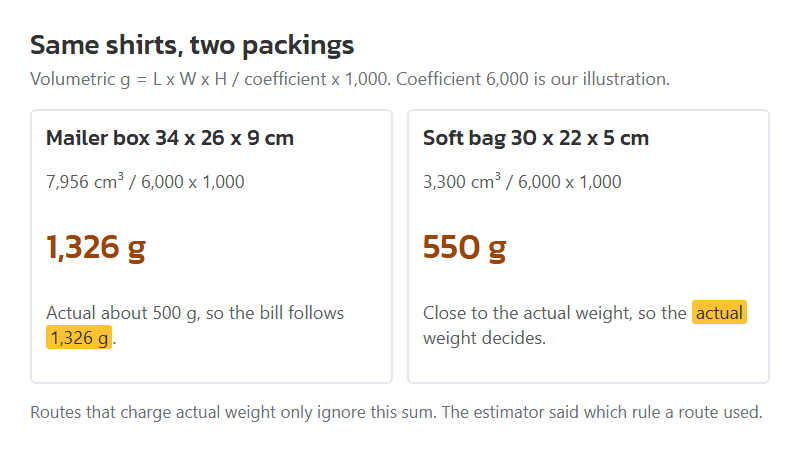
An example with a coefficient we picked for illustration: two folded T-shirts packed in a 34 by 26 by 9 cm mailer is 7,956 cubic centimetres. At a coefficient of 6,000 that is 1,326 g volumetric, against perhaps 500 g actual, so the bill follows 1,326 g. The same shirts in a 30 by 22 by 5 cm soft bag come to 550 g volumetric, and the actual weight decides it. Soft goods in soft packing are where volumetric routes stop hurting.
Limits matter as much as rates. The estimator carried minimum and maximum weights and a cap on any single side length, each filled from the route data. Size bands for long items started at more than 60 cm and climbed through 90, 100, 120 and 150 cm. One stored list of goods not to ship begins with perfume; liquids and powders were split at 10 ml.
Volumetric weight for the two packing choices in the example. Coefficient 6,000 chosen by this site for illustration.