Skip to the phrase cards and content

Independent reader's guide, not run by Pandagoo. pandagoo.com did not load when last checked on October 24, 2026 (Cloudflare 522).

Pandagoo SpreadsheetPhrasebook

Path through this phrasebook: Home / Screens / Warehouse and QC photos

Warehouse screens: arrival, QC photos, storage and forwarding

"My warehouse" was where bought goods waited after arrival, each with photos. The same area handled forwarding orders for parcels you sent in yourself. These cards cover both, then show how to read QC photos against what you asked for.
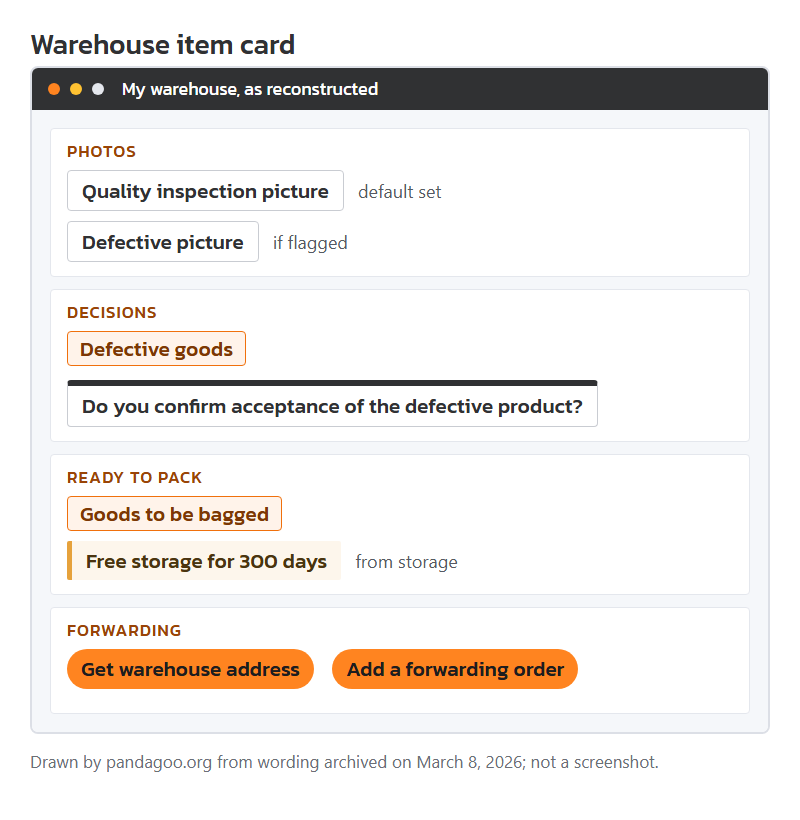
Mock-up of an archived warehouse item card with photo, defect and acceptance labels, drawn by this site.

Arrival and the photo set

The stored promise was five quality inspection photos per item by default, three more for each international parcel, and extra shots free on request. The labels below are where those photos showed up.

Menu or tab

My warehouse
Seen on
Menu item in the personal center.
Means
Every item that has arrived and been checked, waiting for you to ship it.
Your move
Visit after each "Seller Sent" order to see if photos are in.

Field label

Quality inspection picture
Seen on
Label for the photo set of each item.
Means
The warehouse photos of your actual item, taken on arrival.
Your move
Open them full size. Thumbnails hide stitching and print faults.

Field label

Quality inspection video
Seen on
Label for a clip where one exists.
Means
Some items could get a short video instead of, or as well as, photos. Whether it cost extra was not archived.
Your move
Ask for one on items where movement matters: zips, hinges, a watch hand.

Notice text

Free additional photo shoot
Seen on
One of the promises on the home page, with "(Default 5 photos + 3 packages)" beside the photo line.
Means
More photos at no charge when you ask.
Your move
Ask for the angle you actually need, for example "inside label close-up", not just "more photos".

Status tag

Defective goods
Seen on
Tag on an item the warehouse flagged.
Means
Staff saw a fault. A "Defective picture" set shows it.
Your move
Decide quickly: accept it, or start a return while the seller window is open.

Pop-up title

Do you confirm acceptance of the defective product?
Seen on
Pop-up when you press accept on a flagged item.
Means
Accepting means keeping the item as it is. The archive does not spell out what return options remain afterwards.
Your move
Only accept if the fault is cosmetic and you would rather keep it than wait for a swap.

Clickable button

Bulk acceptance
Seen on
Warehouse action for several items at once.
Means
Accept several items in one press.
Your move
Do not use it on a batch that includes a flagged item.

Status tag

Goods to be bagged
Seen on
Status of stored items.
Means
Accepted and ready to go into a parcel.
Your move
These are the items you can pick when generating a parcel.

Shelf time and warehouse add-ons

While goods sat on the shelf, a short list of extras could be attached to them.

Notice text

Free storage for 300 days
Seen on
Home page promise, repeated in the storage notes.
Means
Goods could stay on the shelf for 300 days from storage at no cost. What happened on day 301 was not archived.
Your move
Set a reminder well before the end; a fee or a clearance rule may exist that the archive did not keep.

Field label

Original box storage
Seen on
An add-on on the forwarding form.
Means
Keep the seller's outer box instead of repacking.
Your move
Useful for gifts; costly on freight, because boxes add size.

Field label

Repacking & Reweighing
Seen on
A value-added service name.
Means
Open your parcel, pack it again and weigh it again.
Your move
Ask for it when a quote looks heavy for what is inside.

Notice text

Unpacking inspection for prohibited items
Seen on
Add-on heading on the forwarding form.
Means
Inbound parcels are opened to look for banned goods. The customs notice elsewhere says every arriving package is opened for this.
Your move
Do not send anything into the warehouse you would not want opened.

Forwarding orders for parcels you bought yourself

If you bought directly from a Chinese seller, you could send the parcel to the warehouse and register it there. These lines come from that form.

Clickable button

Get warehouse address
Seen on
Forwarding page button, with "Copy address with one click" beside it.
Means
Shows the address to give your seller. The archive names a South China warehouse.
Your move
Copy it exactly, including any account code line; a missing code is how parcels become unmatched.

Clickable button

Add a forwarding order
Seen on
Main button of the forwarding area.
Means
Registers an incoming parcel so the warehouse can match it to you.
Your move
Register before the parcel arrives, not after.

Field label

Enter China domestic tracking number...
Seen on
Hint in the tracking box; it adds "(letters and/or numbers)".
Means
The Chinese courier number your seller gave you.
Your move
One number per box. A parcel split into several boxes needs one entry each.

Error line

The tracking number is repeated
Seen on
After entering a number already registered.
Means
That parcel is already on a forwarding order.
Your move
Search your forwarding list instead of adding it again.

Notice text

Logistics information for your tracking number...
Seen on
Opening of a long note when the courier has no record.
Means
Either the parcel has not been sent, or the number is wrong. If you are sure it is right, the note says to ignore the warning.
Your move
Re-check the number against the seller chat, then wait a day.

Notice text

For the same order product, it cannot be shipped separately.
Seen on
Friendly reminder on the forwarding pages.
Means
Items registered under one order travel together. You cannot split them into two parcels yourself.
Your move
If you need them split, ask staff before the parcel is built.

Notice text

abnormal package
Seen on
Term used in the warehouse rules for parcels that arrive unregistered.
Means
An arrival with no matching forwarding order. Such parcels were kept only 60 days, after which the rules say ownership passed to the warehouse operator.
Your move
Register every inbound parcel with its tracking number; a late registration within the 60 days can still rescue it.

Notice text

Tmall Global
Seen on
Named in a warning about the South China warehouse.
Means
That warehouse would not take parcels from Tmall Global, nor ones sent from abroad, Hong Kong, Macau or Taiwan into mainland China.
Your move
Buy those through the normal purchasing route or another service.

Matching QC photos to what you typed at checkout

The fastest way to check warehouse photos is to start from what you typed, not from the photo. Your order carries three kinds of instruction: the option you picked under "specification", the quantity, and anything you wrote in the notes box. Each one should have a photo that proves it.

Option: the colour should match under the warehouse's neutral light, and the size label should be readable in at least one frame. Quantity: every piece should be in a frame together, or counted across frames. Notes: if you asked for a zip or a seam to be checked, there should be a close-up of exactly that. Only after those three, look for general faults: loose threads, glue marks, print edges, scuffs on soles.

If one of your instructions has no matching photo, ask for one before accepting. Free extra shots exist for exactly this.
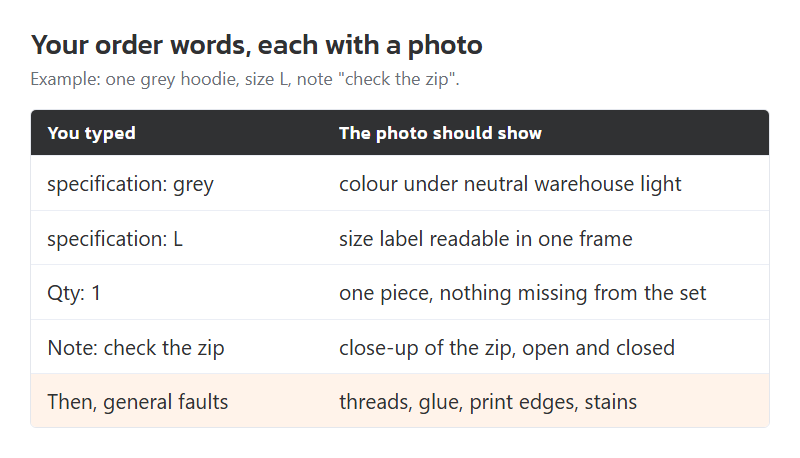
A hoodie order traced from its option, quantity and note to the photo that proves each one. Arrangement by this site.

Previous screen: Order list

Next screen: Parcels and freight

Saw a line you cannot place? Paste it into the phrase finder.