Path through this phrasebook: Home / Screens / Sign-up and sign-in
Sign-up and sign-in screens: the account phrases, decoded
The account screens were the first thing a new Pandagoo user met, and the archive kept almost every line on them. The cards below follow the screens in the order you would have met them: the sign-up form, the other ways in, the email check that pops up later, and the password pages inside the personal center.
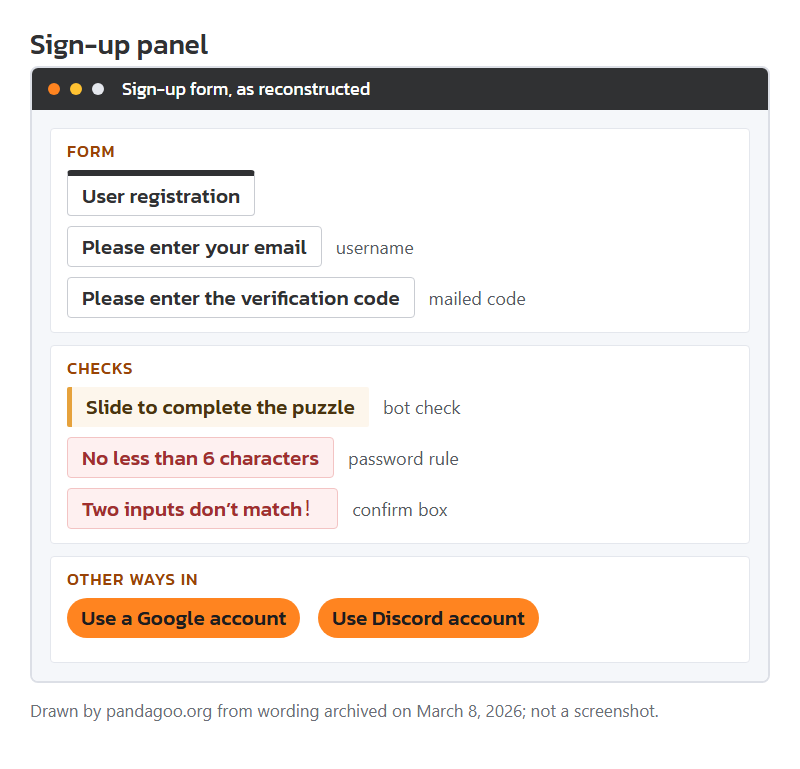
Mock-up of the archived sign-up panel, drawn by this site from the stored wording: email field, code field, slider puzzle and the terms tick box.
Registration panel lines, email to tick box
Pandagoo accounts were keyed to an email address, not a phone number. The form asked for that address, a password typed twice, a code mailed to you, and a tick against the terms. Each line it could show:
Pop-up title
User registration
Seen on
Title of the sign-up panel, reached from the "Free registration" link under the log-in form.
Means
You are creating a new account, not signing in. The same panel switches back if you click "I have an account".
Your move
Use an email inbox you will still control in a year. Every later notice, code and refund message goes there.
Field label
Please enter your email
Seen on
Hint text in the email box of the log-in and sign-up forms.
Means
The email address is your username. There was no separate nickname field on the form itself.
Your move
Type it by hand rather than pasting, so a trailing space does not end up in your account name.
Error line
Incorrect email format
Seen on
Form check message for the email box.
Means
The address failed a basic pattern check, usually a missing "@" or a dot in the wrong place.
Your move
Fix the address; nothing has been sent yet, so no code is waiting for you.
Error line
No less than 6 characters
Seen on
Form check message for the password box.
Means
Six characters is the floor for a password. A sister line, "No less than 4 characters", applied to the email box.
Your move
Go well past six. The personal center later suggested mixing digits and letters, which is a fair minimum.
Error line
Two inputs don’t match!
Seen on
Check message for the confirm-password box. The archive keeps the full-width exclamation mark.
Means
The second password differs from the first by at least one character.
Your move
Retype both boxes. Caps Lock is the usual cause.
Field label
Please enter the verification code
Seen on
Hint text in the verification code box.
Means
A short code was mailed to the address above. The form will not finish without it.
Your move
Open the inbox in another tab; keep the form open so the countdown does not reset.
Short message
Resend after {0} seconds
Seen on
Countdown text on the code button once a code is requested.
Means
The {0} was a live countdown number filled in by the page. You cannot ask for a second code until it reaches zero.
Your move
Wait it out and check the junk folder before resending.
Short message
Do not obtain the verification code repeatedly!
Seen on
Message when codes are requested again too soon.
Means
The page throttles code requests. Pressing again does not speed anything up.
Your move
Stop pressing. A later line asks you to try again after 60 seconds, so give it a full minute.
Notice text
Slide to complete the puzzle
Seen on
Slider check stored with the account forms.
Means
A bot check. The companion line "Hold down the slider and drag" tells you how to move it.
Your move
Drag slowly to where the gap lines up. "Verification failed. Please try again!" just means the piece missed.
Field label
Please check the box to register
Seen on
Message when the agreement box is left unticked.
Means
You must tick the line linking to the sign-up agreement plus the service terms.
Your move
Tick it, but know that the agreement texts themselves were not kept in the archive, only their titles.
Short message
Registration successful
Seen on
Success message at the end of sign-up, paired with "Please log in".
Means
The account exists. The site did not log you in automatically.
Your move
Log in once straight away to prove the password works while you still remember it.
Google, Discord and template log-in titles
Next to the email form the archive lists two social log-ins and two template titles that may never have been switched on. We separate what the stored code shows from what we cannot tell.
Clickable button
Use a Google account
Seen on
Social log-in option on the account forms.
Means
Sign-in through Google instead of a password. The account is still tied to an email address.
Your move
If you use it, note which Google address you picked. Mixing Google sign-in and a password account can leave you with two accounts.
Clickable button
Use Discord account
Seen on
Second social log-in option.
Means
Discord sign-in through an authorisation hand-off. The bundle carries the Discord log-in code, nothing more.
Your move
Same advice: write down which Discord user you authorised.
Error line
Login redirect failed.
Seen on
Opening of the error for a failed Google or Discord hand-off.
Means
The return trip from Google or Discord was refused, often because the pop-up was blocked or the permission was denied.
Your move
Allow pop-ups for the site and try once more, or fall back to the email form.
Short message
Redirecting to login...
Seen on
Message while the hand-off runs.
Means
Nothing is wrong yet. The page is waiting for the outside service.
Your move
Do not press back; let it finish.
Pop-up title
Mobile login
Seen on
A form title in the stored text, next to "QR code login" and "SMS verification code".
Means
These come from the software template. The archive does not show whether phone or QR log-in was offered to shoppers.
Your move
Treat email, Google and Discord as the ways in that are certain.
Error line
your country or region is not accessible
Seen on
Tail of an apology line in the stored text.
Means
A regional block: the service refused visitors from some places. Which places is not in the archive.
Your move
If you see it, no setting on your side will fix it; choose another agent.
The email check that interrupts checkout
Accounts could exist with an unconfirmed address. The archive shows a pop-up that chased you about it at order time, with a coupon offered as the carrot.
Pop-up title
Kindly Reminder
Seen on
Heading of an email reminder stored with the cart text, aimed at accounts with an unconfirmed address.
Means
A nudge, but a serious one: the text under it says orders may fail until the address is confirmed.
Your move
Confirm the address before filling a cart, not halfway through paying.
Pop-up title
Please verify your email address
Seen on
Main line of that reminder.
Means
Confirming also unlocked a shipping coupon bundle labelled CNY 1080. The archive keeps the label, not the coupon rules inside it.
Your move
Do not count on the 1080 figure as cash off your first parcel; read the coupon tab after confirming.
Short message
Verify Email is Sent
Seen on
Shown after you ask for the confirmation mail.
Means
The mail is on its way. A following line warns it may land among junk messages and can take a few minutes.
Your move
Check the spam folder before asking again.
Field label
Update your email address
Seen on
Option on the email confirmation step.
Means
Lets you correct a typo in the address before the mail goes out.
Your move
Use it rather than registering a second account with the right address.
Password pages inside the personal center
After sign-in the same wording turns up again on the security pages. These are the lines worth knowing.
Clickable button
Forgot password?
Seen on
Link on the log-in form.
Means
Starts a reset that mails a code to the account address.
Your move
You need access to that inbox; there was no phone fallback in the stored flow.
Error line
The new password and the old password cannot be the same
Seen on
Check message on the Change password page.
Means
Exactly what it says: reuse is refused.
Your move
Pick a genuinely new one and store it in a password manager.
Field label
Current login IP
Seen on
Personal center summary, stored with "Last login IP" and "Last login time".
Means
The network addresses of this sign-in and the one before it.
Your move
Glance at "Last login IP" now and then. An address in a country you have never been to is a reason to change the password.
Error line
Login timeout, please log in again!
Seen on
Appears when a page action fails after a long idle spell.
Means
Your session expired. Whatever you were saving may not have been saved.
Your move
Sign in, then check the form or cart you were working on before re-entering anything.
Account details to note on day one
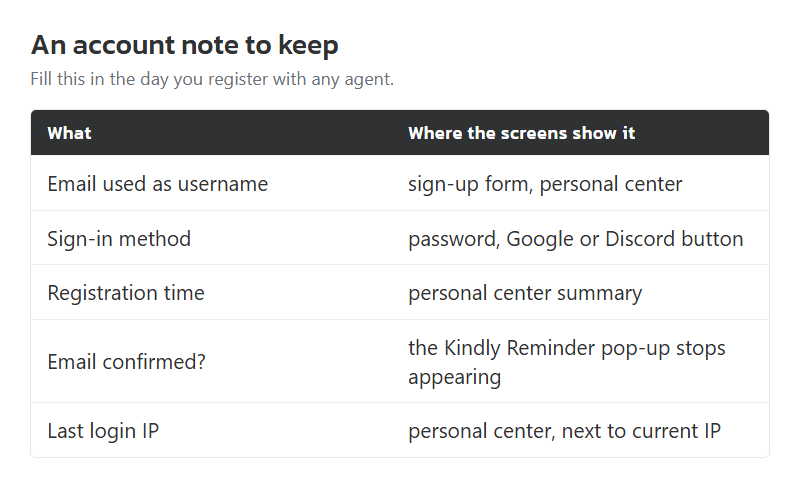
A shopping agent account is a record of money held and goods stored, so treat its sign-in details like a bank login. The Pandagoo screens give you the pieces to note: the email used as username, the sign-in method (password, Google or Discord), the registration time shown in the personal center, and whether the email was confirmed.
Keep them in one note, not in your head. When a site stops answering, as pandagoo.com has, the questions you will be asked by a card issuer or a payment service start with "which email" and "when did you sign up". The account screens were the only place those answers lived.
A blank account note laid out by this site: email used, sign-in method, registration date, confirmation status.