Path through this phrasebook: Home / Screens / Order list
Order list wording: every status a purchase could carry
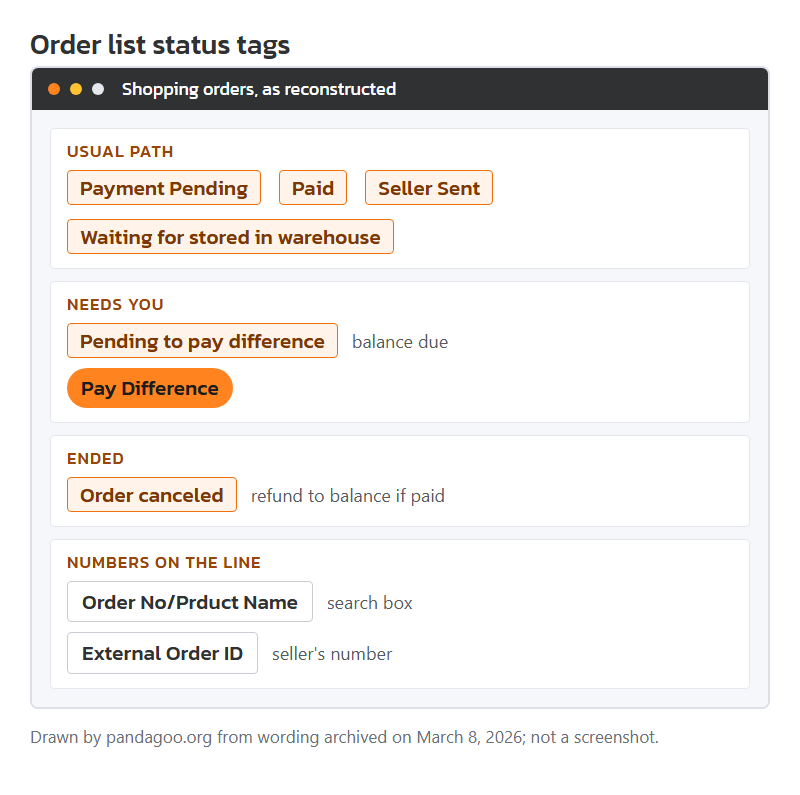
Once paid, an item lived on the "Shopping orders" list until it reached the warehouse. The list spoke in short statuses. Below, each status gets a card in the order an item normally passes through them, followed by the side labels and the bulk tools.
Mock-up of the archived order list with status tags, drawn by this site from the stored labels.
Purchase status tags, Paid through Order canceled
Not every order shows every status. A smooth order jumps from paid to seller-sent to stored. The ones in the middle appear when something needs your attention.
Status tag
Payment Pending
Seen on
Order list tag, and a filter tab of the same name.
Means
The order exists but no money has reached it. The countdown from the payment page still runs.
Your move
Pay or delete it. An expired order turns into "Order canceled" on its own.
Status tag
Paid
Seen on
Tag after a successful payment.
Means
Money received; staff have not bought the item yet.
Your move
Nothing to do. If it stays here past one working day, ask in chat.
Status tag
To be purchased
Seen on
A value of the "Purchasing status" field.
Means
Queued for the purchasing team, who worked China office hours.
Your move
Wait; orders paid at night are bought the next morning, China time.
Status tag
To be delivered by the seller
Seen on
After-purchase status in the same list of values.
Means
Bought from the seller, who has not yet sent it.
Your move
Look at the seller's usual dispatch time on the listing. Chase only after that has passed.
Status tag
Seller Sent
Seen on
Order list tag.
Means
The seller handed the parcel to a Chinese courier. A domestic tracking number usually appears in the order details.
Your move
Copy that number somewhere. It is the only proof of dispatch you hold.
Status tag
To be signed by warehouse
Seen on
Status while the courier is on its way to the warehouse.
Means
In transit inside China, not yet received.
Your move
If it sits here for a week, the domestic number is worth checking on the courier's own site.
Status tag
Waiting for stored in warehouse
Seen on
Fourth stage of the purchase progress steps.
Means
Received but not yet checked and shelved. Photos come after this.
Your move
Wait for the photos before deciding anything about the item.
Status tag
Pending to pay difference
Seen on
Tag when the price or delivery charge rose after you paid.
Means
Staff need more money before buying or before moving on. The details split it into "Product balance due" and "Shipping balance due".
Your move
Read which of the two it is. A product balance due often means the seller changed the price; you can ask to cancel instead.
Clickable button
Pay Difference
Seen on
Button beside a balance-due order.
Means
Pays the gap from your balance.
Your move
If your balance is short you will see "Insufficient balance. Please top up." first.
Status tag
Order canceled
Seen on
Tag on cancelled orders; a filter tab collects them.
Means
Either the payment window ran out, you cancelled, or staff could not buy the item.
Your move
If you had paid, look for the refund in the balance records, not on your card.
Side labels on each order line
Each line on the list carried a few smaller labels. These are the ones that cause questions.
Field label
Order No/Prduct Name
Seen on
Order list search hint. "Prduct" is misspelled in the stored text.
Means
Search by the agent's order number or by words from the product name.
Your move
Order numbers are faster; product names copied from Chinese listings rarely match what you remember.
Field label
External Order ID
Seen on
A field in the order details.
Means
The seller's own order number on Taobao, Weidian or 1688.
Your move
Quote it when staff contact the seller about a fault. It is how the seller finds your purchase.
Field label
Additional service
Seen on
Order list label.
Means
Extras you added at checkout, such as extra photos.
Your move
Check it matches what you meant to buy; extras are charged per item.
Clickable button
Consolidated payment
Seen on
Order list action.
Means
Pay several unpaid orders in one go.
Your move
Useful to pay the flat handling fee once instead of once per order.
Field label
Other operations
Seen on
Order list label for the action area.
Means
Where cancel, after-sales and message links sit.
Your move
Start any complaint from here so it is attached to the right order.
Status tag
Outstanding funds
Seen on
Amount label in the order details.
Means
Money still owed on this order.
Your move
Clear it before the item can move on to a parcel.
Bulk upload and its messages
For long lists of links the archive offered a spreadsheet-style upload. The steps were: download a template, fill it, import it, then read the result.
Clickable button
Download template
Seen on
Step one of the bulk upload page.
Means
A blank file to fill with product links, options and quantities.
Your move
Keep your own copy; the page says one download is enough for later uploads.
Field label
Import the completed template...
Seen on
Step two; the line continues "in the original format".
Means
Upload the filled file without changing its layout.
Your move
Do not add or rename headings; the import reads fixed positions.
Field label
Number of failed orders
Seen on
Result block, next to "Number of successful orders".
Means
How many lines of your file became real orders and how many did not.
Your move
Open "Processing record details" to see which lines failed and why.
Status tag
Processing state
Seen on
Status of each upload batch.
Means
Whether the system has finished reading your file.
Your move
Wait for it to finish before uploading the same file again, or you may get duplicates.
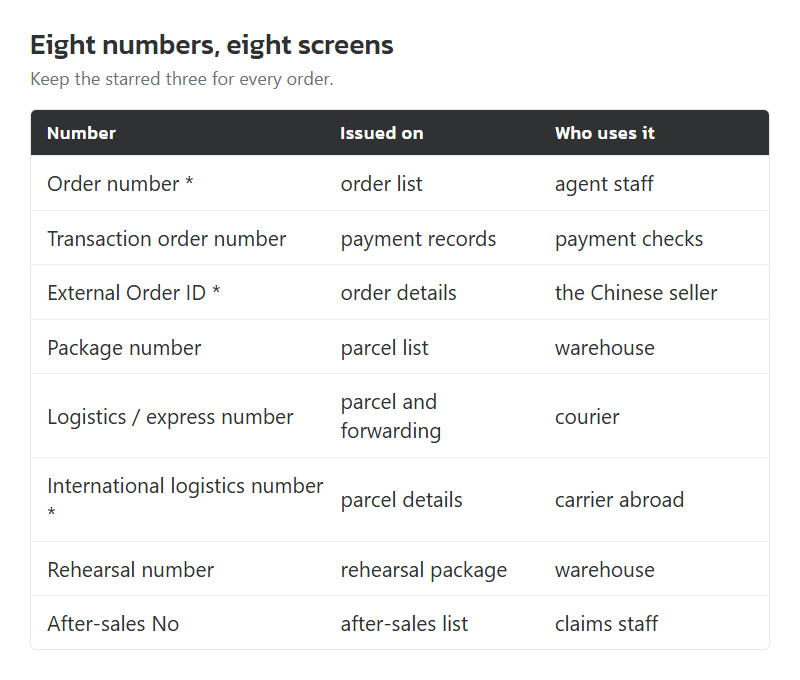
Eight numbers the screens give you, and which to keep
Agent sites hand out numbers at every step, and they all look alike. The archive names eight of them. The order number belongs to one purchase. The transaction order number belongs to one payment, which can cover several orders. The external order ID is the seller's. The package number belongs to the parcel you build later, and the logistics or express number to the courier carrying it. Rehearsal, after-sales and withdrawal numbers each track their own request.
Keep three of them for every order: the order number, the external order ID and, once shipped, the international logistics number. Between them they let the agent, the seller and the carrier each find your goods without the others.
The eight identifiers named in the archived screens, each placed on the screen that issues it. Layout by this site.