Path through this phrasebook: Home / Screens / Cart and checkout
Cart, checkout and payment: the money screens line by line
Between the cart and "Payment successful!" the archive holds more money labels than any other part of the site. These cards read them in the order the screens show them, then add up what each one costs in a worked example.
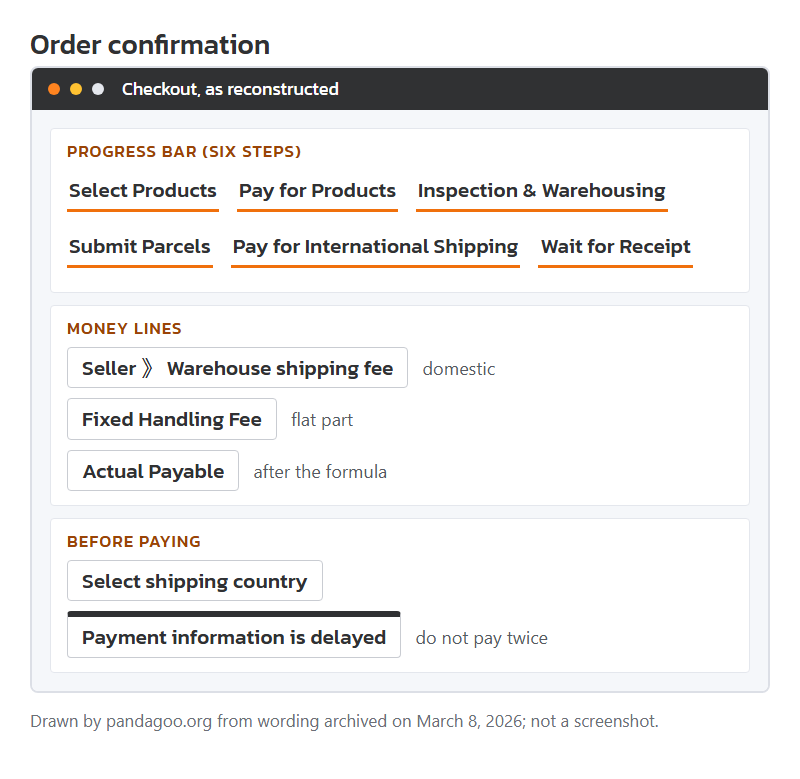
Mock-up of the archived order confirmation page, drawn by this site from the stored labels, with the six-step bar across the top.
Inside the shopping cart
The cart showed goods and the first leg of freight only. Every total on it leaves out the trip abroad.
Field label
Seller 》 Warehouse shipping fee
Seen on
Cart label for each seller's delivery charge. The archive uses a double angle mark as the arrow.
Means
The seller's own delivery charge inside China, from their shop to the agent warehouse.
Your move
Expect it per seller, not per item. Buying three things from one shop usually means one of these, not three.
Field label
Subtotal (excluding international shipping)
Seen on
Cart total label.
Means
Goods plus domestic delivery. The international parcel is billed later, as a separate payment.
Your move
Do not compare this number with an all-in price from another shop.
Notice text
International freight charges are not included
Seen on
Cart summary note, stored with a pointer to the freight estimation page.
Means
Same warning in plain words.
Your move
Open the freight estimator with a guessed weight before you pay for goods.
Field label
The final price will be confirmed...
Seen on
Order Summary box in the cart; the line ends "on the next page".
Means
Coupons, value-added services and the handling fee are added after the cart.
Your move
Treat the cart figure as a draft.
Short message
Shopping cart is empty, go to buy now ~
Seen on
Empty cart.
Means
Nothing saved. Items you added while signed out may not have carried over.
Your move
Sign in first, then add items.
Error line
Please select a product
Seen on
Pressing checkout with nothing ticked.
Means
Cart lines have tick boxes; only ticked lines go forward.
Your move
Tick the lines you want to pay for now and leave the rest.
The order confirmation page
Pressing checkout led to "Confirm Order", with a six-step bar across the top: select, pay for products, inspection and warehousing, submit parcels, pay for international shipping, wait for receipt. You are at step one or two here.
Pop-up title
Confirm Product Information
Seen on
Heading on the order confirmation page.
Means
Last look at options, quantities and notes.
Your move
Check each option name against what you chose; "Back to cart and edit" sits right beside it.
Field label
Freight to the Warehouse
Seen on
Order confirmation label.
Means
The domestic delivery charge again, now fixed for this order.
Your move
If it reads zero for a seller who normally charges, ask before paying; staff may add it later as a balance due.
Field label
Value-added Service Fee Involved
Seen on
Order confirmation label for extras.
Means
Optional services carry their own fee. The amounts were not kept in the archive.
Your move
Open the extras and remove the ones you did not mean to add.
Field label
Please select a coupon
Seen on
Coupon picker, stored with "I have a new coupon code".
Means
Coupons from your account, or a code typed in.
Your move
Coupon rules were not archived; check the minimum spend shown on the coupon itself.
Field label
Product Notes
Seen on
Free text box with a reminder to write only when you have special needs.
Means
Notes go to the purchasing staff, not to the seller directly.
Your move
Write one clear request per note, such as "check both shoes are the same size", and nothing chatty.
Field label
Select shipping country
Seen on
Picker on the confirmation page.
Means
The text under it explains why: the platform will judge whether your goods can be shipped according to the country.
Your move
Choose your real destination now; some goods that clear one country are refused for another.
Pop-up title
Small-scale Authorization Agreement...
Seen on
Title of an agreement you tick at checkout; "Safety Statement" sits next to it.
Means
An authorisation for the agent to buy on your behalf. Only the titles were archived, not the terms.
Your move
Without the text there is nothing to quote; keep a screenshot of whatever version you accept.
Field label
Authorize the deduction of the difference
Seen on
Confirmation page option.
Means
Lets staff settle small price gaps out of your balance instead of messaging you each time.
Your move
Tick it only if you keep some balance and trust the seller's price to be stable.
The payment page and its handling fee
The payment page added one or two fees on top and showed a countdown. These are its lines.
Field label
Please select a payment channel
Seen on
Payment page prompt; channels named in the code include card, PayPal, balance and others.
Means
The handling fee is shown on this page. Channel names survived; the rates did not.
Your move
If two channels are offered, compare "Actual Payable" for each before choosing.
Field label
Fixed Handling Fee
Seen on
One of two fee lines on the payment page.
Means
A flat US-dollar amount added per payment, as the formula below shows.
Your move
Fewer, larger payments pay this flat part fewer times.
Field label
Actual Payable
Seen on
Payment page total.
Means
Goods (or parcel) amount plus the flat fee, then divided by one minus the percentage fee. The division makes the percentage bite slightly harder than it looks.
Your move
Use this line, not the cart total, when you check your bank statement.
Field label
Pay with Balance
Seen on
A channel option.
Means
Pays from money already topped up.
Your move
Check whether the handling fee line changes when you pick balance; the archive does not say.
Short message
Please pay before
Seen on
Followed by a time and ", or it will be cancelled."
Means
An unpaid order expires. A "Cancel countdown" label showed the time left.
Your move
If you need to wait for payday, do not start checkout yet.
Pop-up title
New page payment
Seen on
Pop-up shown while a card or PayPal payment runs on a separate page.
Means
The payment happens on the other page; this window waits.
Your move
Do not close it. Press "Completed payment" only after the other page confirms.
Pop-up title
Payment information is delayed
Seen on
Shown if the money left your account but the order still says unpaid.
Means
Three causes were listed: a slow network notice (allow about an hour), a PayPal review, or an electronic check, which could take three to seven days.
Your move
Do not pay twice. If nothing was taken from your account, the stored advice is simply to pay again.
Short message
Oops, payment failed!
Seen on
Result page after a failed attempt.
Means
The charge did not go through. If you were charged anyway, the page says to contact staff at once.
Your move
Check the bank or PayPal record before retrying.
Error line
Insufficient balance for payment
Seen on
When paying from balance.
Means
The balance is lower than the order total. A link offers to top up first.
Your move
Top up slightly more than the gap; the fee line can move the total.
Money labels in screen order, with a worked sum
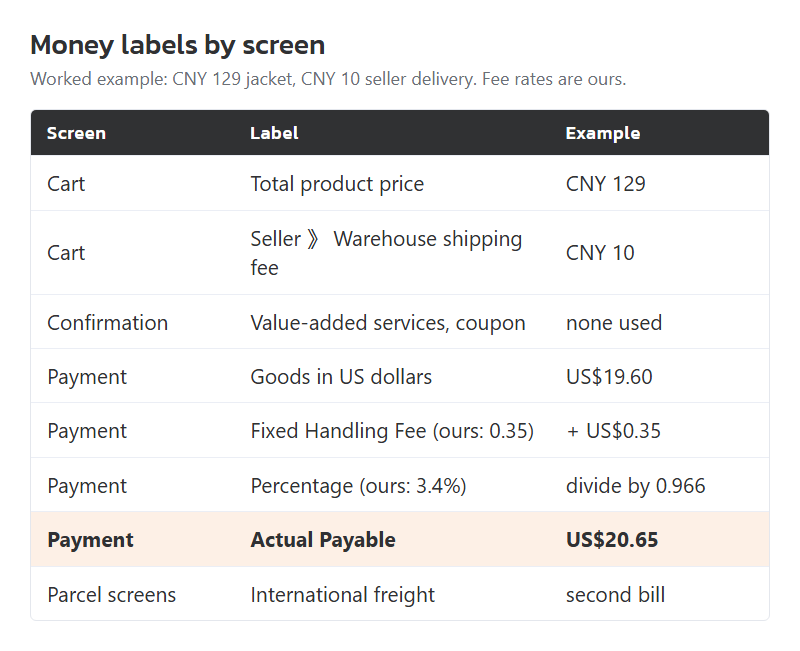
Read the money labels as three screens rather than one bill. The cart shows goods and the seller-to-warehouse fee. The confirmation page adds value-added services and takes off coupons. The payment page adds the handling fee, a flat part plus a percentage. The international parcel is a second, separate bill later, on the parcel screens.
A worked example with figures we chose ourselves, because the archive kept the formula but not Pandagoo's own rates: a CNY 129 jacket plus CNY 10 seller delivery, paid as US$19.60 of goods, with a flat fee of US$0.35 and 3.4 per cent. The payable is (19.60 + 0.35) / (1 - 0.034) = US$20.65. The extra US$1.05 is 5.4 per cent of the goods, because the flat part weighs more on a small order.
The money labels grouped by the screen that shows them, with the worked example totalled at the bottom. Rates in the example are ours, not Pandagoo's.